
Choose an app
Compare Vless VPN, GW VPN and Rabochiy VPN. Install the one that suits you from Google Play.
Compare apps
Three VPN apps for Android.
Choose yours — and connect
without manual setup.
On Google Play · Free servers available
Your first connection
No configuration files.
Everything you need is in the app.
Compare Vless VPN, GW VPN and Rabochiy VPN. Install the one that suits you from Google Play.
Compare appsOpen the VPN app and accept the Android system prompt. The VPN cannot work without this permission.
Keep automatic selection if available, or choose a country manually. The list depends on the app.
View the directoryTap the connect button, wait for the status in the app, then open the site you need. Not loading? Try another server.
If you need helpApps
One developer. Different features.
Choose what works for you.
Just connect
One-tap connection and servers in several countries. No limits on connection time or data usage.
Android · Contains ads
No registration
Open the app and connect. Free servers, unlimited data and AWG3 support.
Android · Contains ads
More control
Automatic server selection and split tunneling. Decide which apps use the VPN.
Android · Ads and in-app purchases
Check each app’s Google Play listing for current Android requirements, terms and availability.
For your needs
No need to add servers manually in Vless VPN or GW VPN. Install the app and choose a connection.
Choose an app ↗Speed depends on your network, distance and server load. If the connection is unstable, switch servers in the app.
View countries ↗With an allowlist, only selected apps use the VPN. With a blocklist, selected apps connect directly while all other apps use the VPN.
Explore Rabochiy VPN ↗Network locations
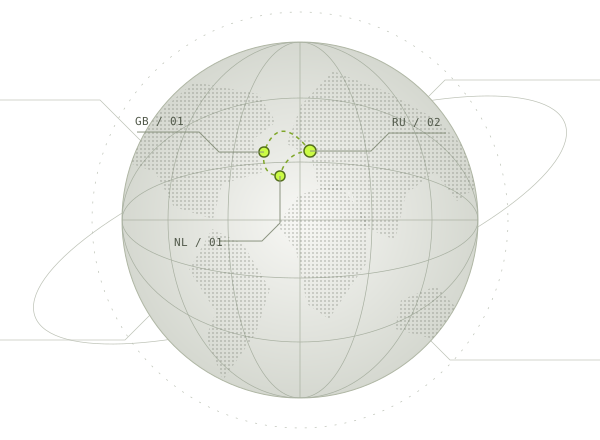
Vless VPN server directory.
Check current availability in the
app.
countries
4 servers in the directory
GW VPN and Rabochiy VPN may have different lists. Open the app you need to see its servers.
The original directory lists two servers in Russia. Select the country in Vless VPN and check the connection.
Open Vless VPN on Google Play ↗The original directory lists one server in the United Kingdom. Select the country in Vless VPN and check the connection.
Open Vless VPN on Google Play ↗The original directory lists one server in the Netherlands. Select the country in Vless VPN and check the connection.
Open Vless VPN on Google Play ↗That country is not in the directory.
Showing 3 of 3 countries
This is not live ping. These values come from the website’s reference data, not measurements from your device. Actual latency and availability may differ.
No fine print
A VPN is a useful tool.
But it doesn’t promise that everything
is possible online.
Free access doesn’t mean ad-free. Rabochiy VPN also offers in-app purchases.
Your provider, distance to the server and server load affect the connection. Operation in every network and country is not guaranteed.
Before installing, read the Data safety section on Google Play and the privacy policy.
Read the policy ↗Questions and answers
Can’t find your question here?
Contact support ↗
Vless VPN and GW VPN work well for connecting without manual setup. If you want to decide which apps use the VPN, try Rabochiy VPN — it supports split tunneling.
Compare all three ↗All three apps offer free servers and contain ads. Rabochiy VPN also has premium servers and in-app purchases. Check the app and Google Play for current terms.
You can connect in GW VPN without registering. In the other apps, follow the prompts on first launch: requirements may change with updates.
Check your internet connection without the VPN, update the app and try another server. If another VPN is active on your device, turn it off. Then test the connection on Wi-Fi and mobile data.
Still not working? Send support the app name, phone model, Android version and error message. Do not send passwords or access keys.
Contact support ↗This page features Android apps available on Google Play. Versions for iOS, Windows and macOS are not distributed here.
In Rabochiy VPN, open the split tunneling settings and choose your apps. An allowlist routes selected apps through the VPN; a blocklist excludes them from the VPN route. Reconnect after changing the settings.
No. The directory shows approximate values from the original data, not measurements. The website does not connect to VPN servers. Check latency and availability in the app on your own device.
Open the app where you enabled the VPN and tap disconnect. You can also open Android’s VPN settings and disconnect the active connection there. The section name depends on your phone model.